The Monthly Booking Limit feature allows you to control how many meeting room bookings each employee can make per month using a simple credit system. Each booking consumes a certain number of credits based on its duration, and once an employee runs out of credits, they can no longer book meeting rooms until the next month.
The monthly booking limit is a credit-based system that gives each employee a set number of credits per month. Every meeting room reservation costs a certain number of credits depending on its length. This ensures fair distribution of meeting room availability across your organization and prevents individual users from over-booking shared spaces.
Navigate to settings: Go to the settings menu in Dibsido.
Select Rooms settings: Under settings, choose the "Rooms" option.
Go to Features tab: Within the room settings, click on the "Features" tab.
Enable Monthly Booking Limit: Find the "Monthly Booking Limit" option and toggle it on.
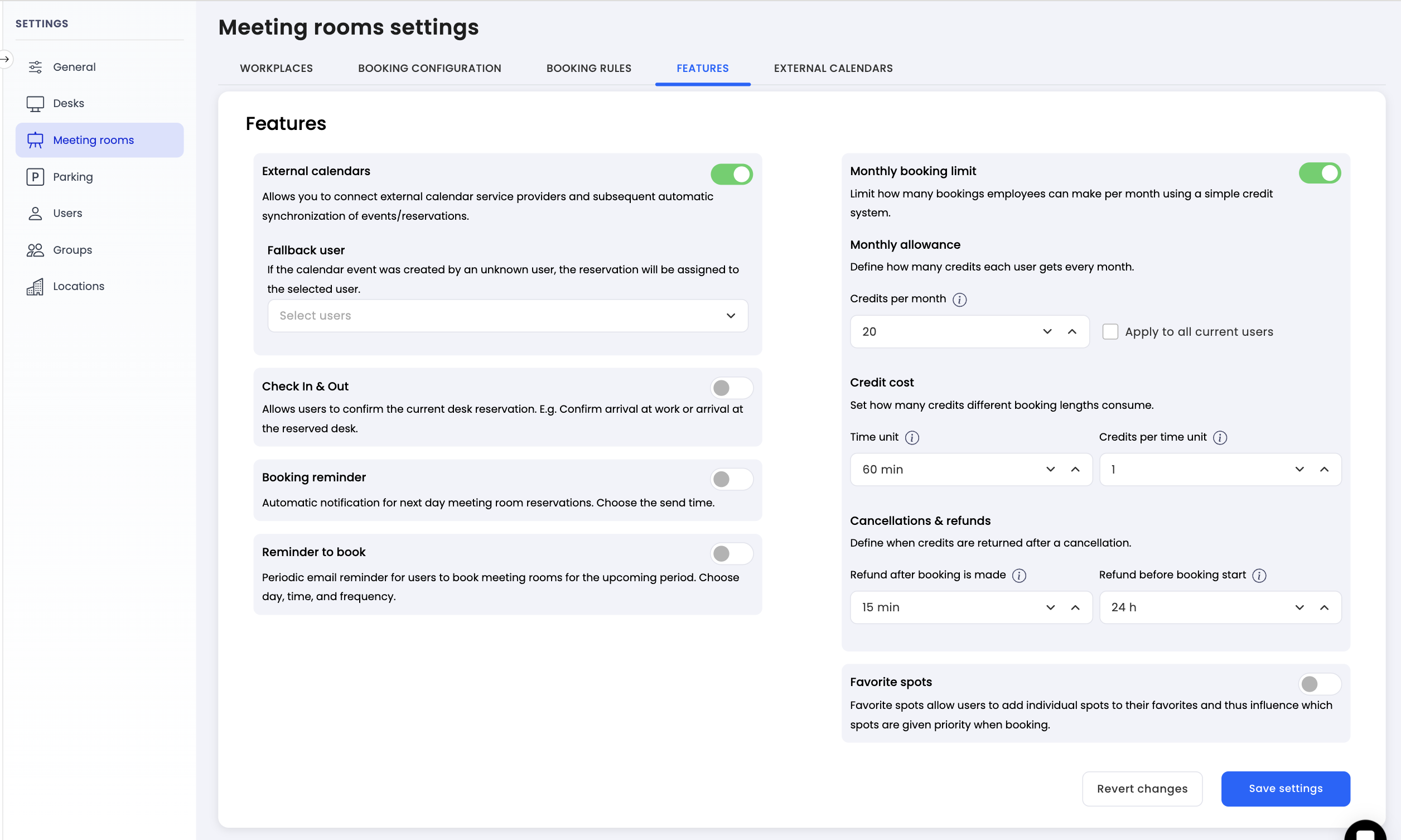
Once the feature is enabled, you need to define how many credits each employee receives every month.
Credits per month: Set the total number of credits each user gets at the beginning of every month. For example, setting this to 20 means each employee starts the month with 20 credits.
Apply to all current users: Check this option if you want the new credit allowance to be applied to all existing users immediately.
The credit cost determines how many credits a booking consumes based on its duration.
Time unit: Define the base time unit in minutes. For example, setting this to 60 means the system calculates credit cost per 60-minute block.
Credits per time unit: Set how many credits one time unit costs. For example, setting this to 1 means a 60-minute meeting room booking costs 1 credit.
With these settings, a 2-hour meeting would cost 2 credits, and a 30-minute meeting would still cost 1 credit (based on the minimum time unit).
To keep the system fair, you can configure when employees get their credits back after cancelling a reservation. There are two refund conditions:
Refund after booking is made: Set the time window (in minutes) after creating a reservation during which the employee can cancel and receive a full credit refund. For example, setting this to 15 means the employee can cancel within 15 minutes of making the booking and get their credits back, regardless of when the reservation is scheduled.
Refund before booking start: Set the time window (in hours) before the reservation start time during which a cancellation still qualifies for a credit refund. For example, setting this to 24 means the employee will receive a refund if they cancel at least 24 hours before the meeting is scheduled to start.
If a cancellation falls outside both of these windows, the credits will not be refunded.
Your company sets the following configuration:
Credits per month: 20
Time unit: 60 minutes
Credits per time unit: 1
Refund after booking is made: 15 minutes
Refund before booking start: 24 hours
An employee books a 2-hour meeting room for Wednesday. The booking costs 2 credits, leaving them with 18 credits. If they realize the meeting is no longer needed and cancel within 15 minutes of creating the booking, they get 2 credits back. Alternatively, if they cancel on Monday (more than 24 hours before Wednesday), they also receive a full refund. However, if they cancel on Tuesday evening (less than 24 hours before), the 2 credits are not refunded.
The Monthly Booking Limit feature gives you full control over meeting room usage. By configuring credits, cost per time unit, and refund policies, you can ensure that meeting rooms are shared fairly and used efficiently across your organization. Set it up in the Rooms settings under the Features tab.
