
When employees create repeating (recurring) desk reservations, the repeating booking limit controls how far into the future those reservations can be generated. By default, this limit matches the booking timeframe, but administrators can extend it to allow longer recurring bookings when needed.
How repeating bookings and timeframes work together
Every employee has a booking timeframe that defines how far in advance they can create reservations. For example, if the timeframe is set to one month, employees can only book desks up to one month ahead.
When an employee creates a repeating booking, the system generates individual reservations only within the repeating booking limit. By default, this limit copies the booking timeframe. So if the timeframe is one month, the repeating reservations are also created for one month ahead.
However, you can extend the repeating booking limit independently of the timeframe, allowing recurring reservations to be generated further into the future, up to one year. This means that even though an employee can only make individual bookings one month ahead, their repeating bookings can be pre-created for several months or even a full year.
If the repeating booking limit is set to a shorter period than the booking timeframe, the option to create repeating reservations will not be available to employees at all.
Configuring the repeating booking limit
Navigate to settings: Go to the settings menu in Dibsido.
Select Desks settings: Under settings, choose the "Desks" option.
Go to Booking Configuration tab: Within the desk settings, click on the "Booking Configuration" tab.
Find Repeating Booking Limit: Locate the "Repeating Booking Limit" section.
Choose the limit period: Select the desired maximum period from the dropdown. You can extend it beyond the standard booking timeframe, up to one year.
Save changes: Click "Save" to apply the settings.
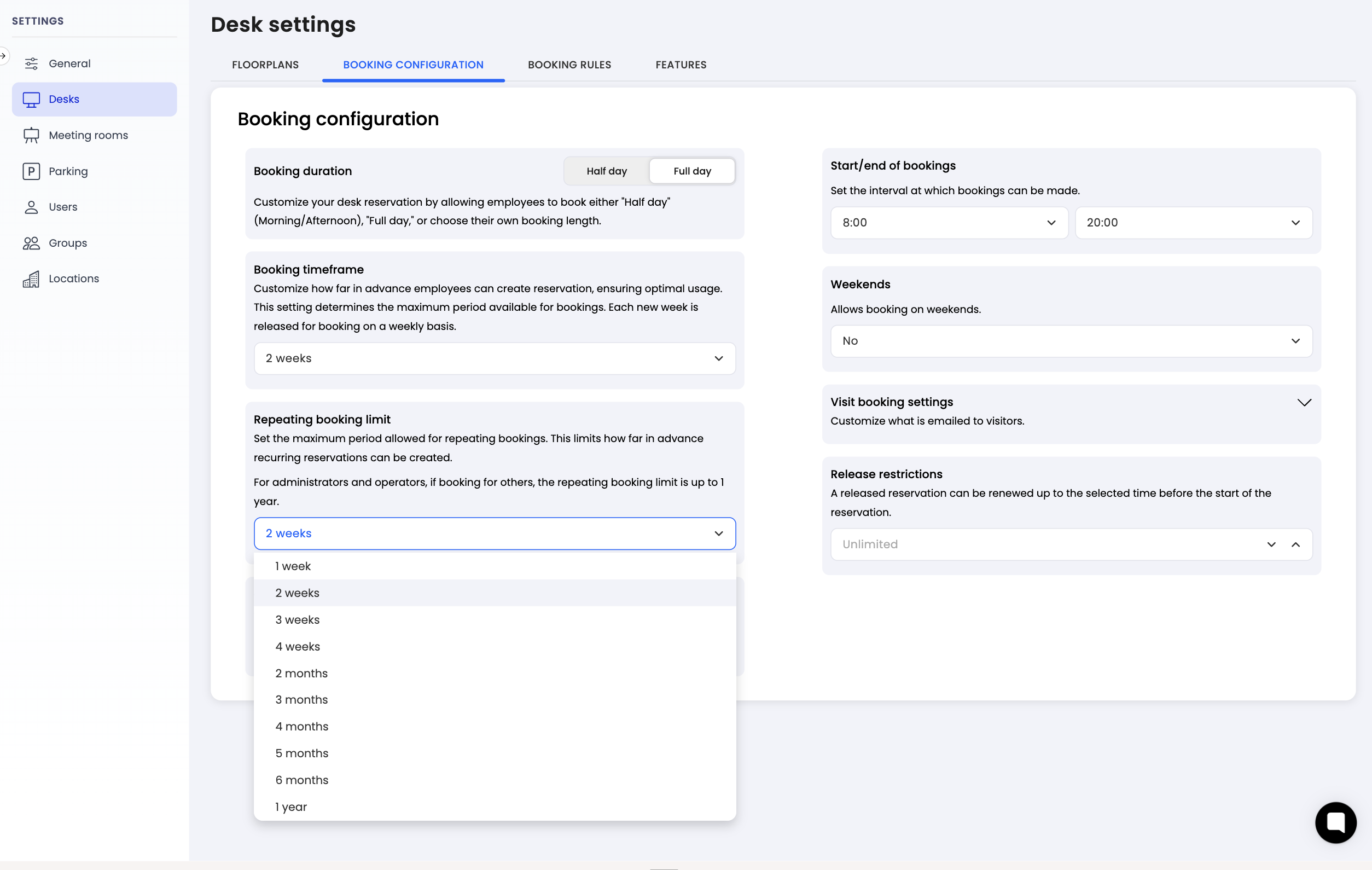
How it works for administrators
For administrators and operators booking on behalf of other employees, the repeating booking limit is always set to one year, regardless of the setting configured for regular users. This ensures that admins can create long-term recurring reservations for their team without being restricted.
Consider using desk allocation instead
If your company wants certain employees to have a desk available for them every day without needing to create reservations manually, consider using the desk allocation feature instead of repeating bookings. With desk allocation, a specific desk is permanently assigned to an employee, and reservations are automatically created for them. There is no need for the employee to book anything.
This approach is often more practical for employees who come to the office regularly and always need the same desk. You can learn more about this in the How to allocate a desk article.
Summary
The repeating booking limit lets you control how far ahead recurring desk reservations can be created. By default it matches the booking timeframe, but you can extend it up to one year for employees who need longer recurring schedules. Keep in mind that setting the limit shorter than the booking timeframe will disable the repeating booking option entirely. For a simpler alternative, consider using desk allocation for employees who need a guaranteed desk every day. Configure the repeating booking limit in the Desks settings under the Booking Configuration tab.