
When all desks are taken on a day, users can join a waiting list. Depending on your settings, they are either notified when a desk frees up, or the freed desk is booked automatically for the first person in line.
A similar waiting list is available for parking. See Managing alerts for available parking spots.
Turn on the waiting list
Go to Settings → Desks.
Open the Features tab.
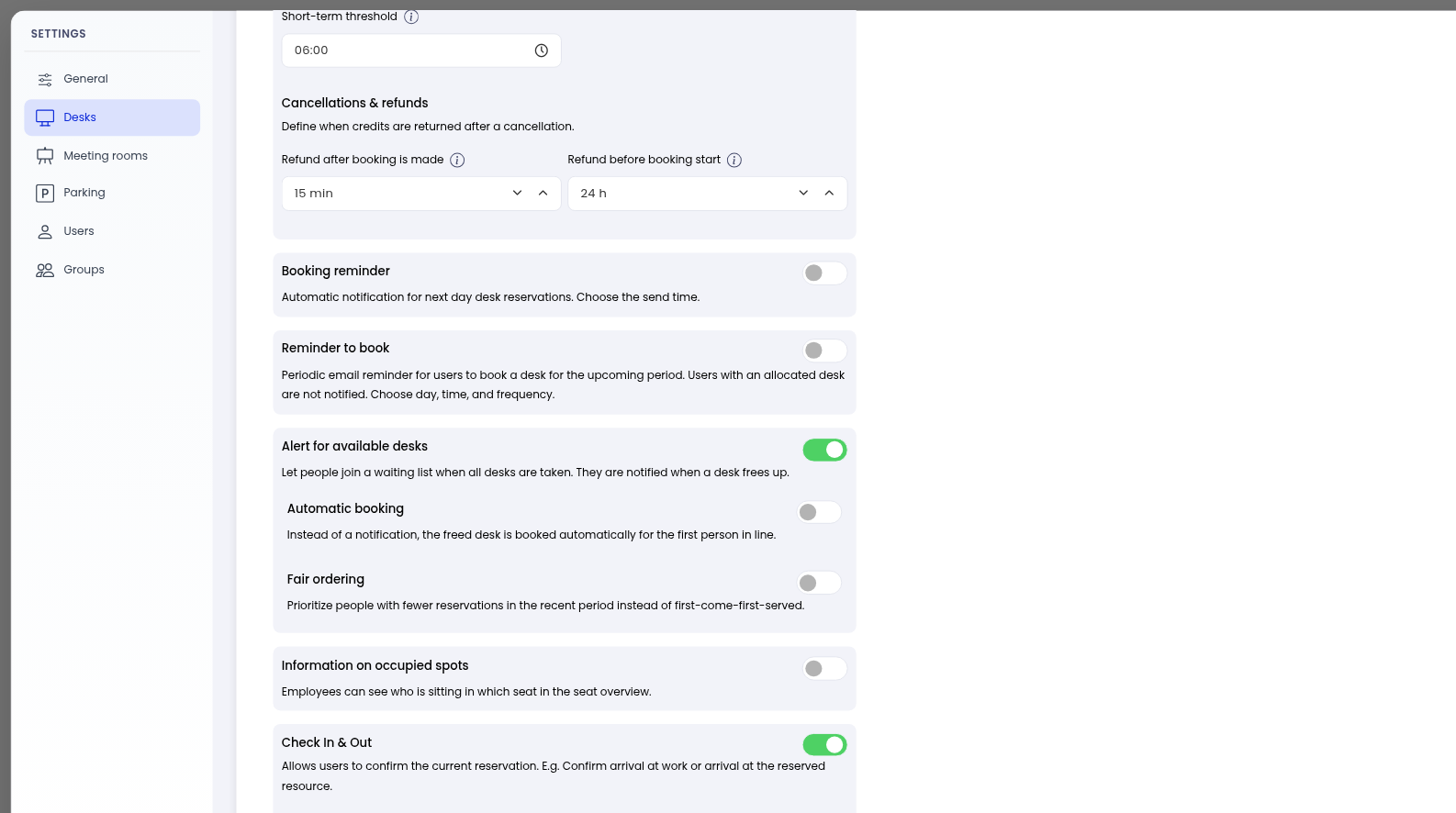
Turn on Alert for available desks. People can then join a waiting list when all desks are taken, and they are notified when a desk frees up.
Automatic booking
Under Alert for available desks, turn on Automatic booking if you want the freed desk to be booked automatically for the first person in line, instead of sending a notification.
Leave Automatic booking off if you only want to send a notification.
Fair ordering
Turn on Fair ordering to prioritize people with fewer reservations in the recent period, instead of first-come-first-served.
If Fair ordering is off, the waiting list is first-come-first-served.
Notifications
Notifications of free desks from the waiting list are sent through the Notices notification type. You can use Email, Slack, and Push.
Go to Settings → General.
Open the Notifications tab.
Under Default settings for employees, find Notices and choose the channels you want to use.
How users join the waiting list
When all desks are taken on a day, users can join the waiting list. They stay on the list until a desk frees up, or until they leave it.
Related articles: